Appearance
Settings
Everything on the CMRA Sync setup page. Open it by clicking the CMRA Sync icon in your browser's toolbar (the puzzle piece, then CMRA Sync). The page has two sections to fill in and a short note about what CMRA Sync sends.
1. Sign in
| Setting | What it does | Default |
|---|---|---|
| Sign in / Sign in again | Opens the FSC sign-in window and fetches your organisation's licence. | Not signed in |
| Renew now | Asks for a fresh licence without a window. Only shows once you are signed in. If it cannot, it says to use Sign in again. | |
| Forget this licence | Removes the licence from this browser. Your saved data is not touched. | |
| The line under the heading | Tells you where the licence stands. See the table below. |
The line under 1. Sign in is one of these:
| You see | It means |
|---|---|
| Not signed in. | Nothing can run yet. Click Sign in. |
| Licensed until and a date | All good. |
| Licensed until a date (renewal is overdue; sign in again) | Still works, but it has not been renewed for a few days. Click Sign in again. |
| The licence could not be renewed. CMRA Sync keeps working until a date | Grace period. See Licence grace. |
| The licence has expired: it could not be renewed for over 14 days. | Nothing new can run. Click Sign in again. |
| This computer's clock is behind... | The date or time on this computer is wrong. Fix it, then sign in again. |
Under the line you also see your name, your email, your organisation, and Licensed store numbers. That list is every store on your licence.
2. Your stores
| Setting | What it does | Default |
|---|---|---|
| Store number | The store this browser works on: three to six digits, as MPS shows next to My Center. | Empty |
| Name | A label so you can tell stores apart. Optional. | Empty |
| BCG location id | BCG's own number for the store, the cmraId in a BCG page address. Lets CMRA Sync tell which store a BCG page belongs to. Optional. | Empty |
| Add store | Saves the store. | |
| Remove | Takes the store out of setup. Its saved data is kept. | |
| Licence column | Licensed, Sign in first, Licence expired, or Not on your licence. A store needs to be on your licence to run. | |
| Add (a button with a store number) | Appears when saved data exists for a store that is not in the list. Click it to add the store back. |
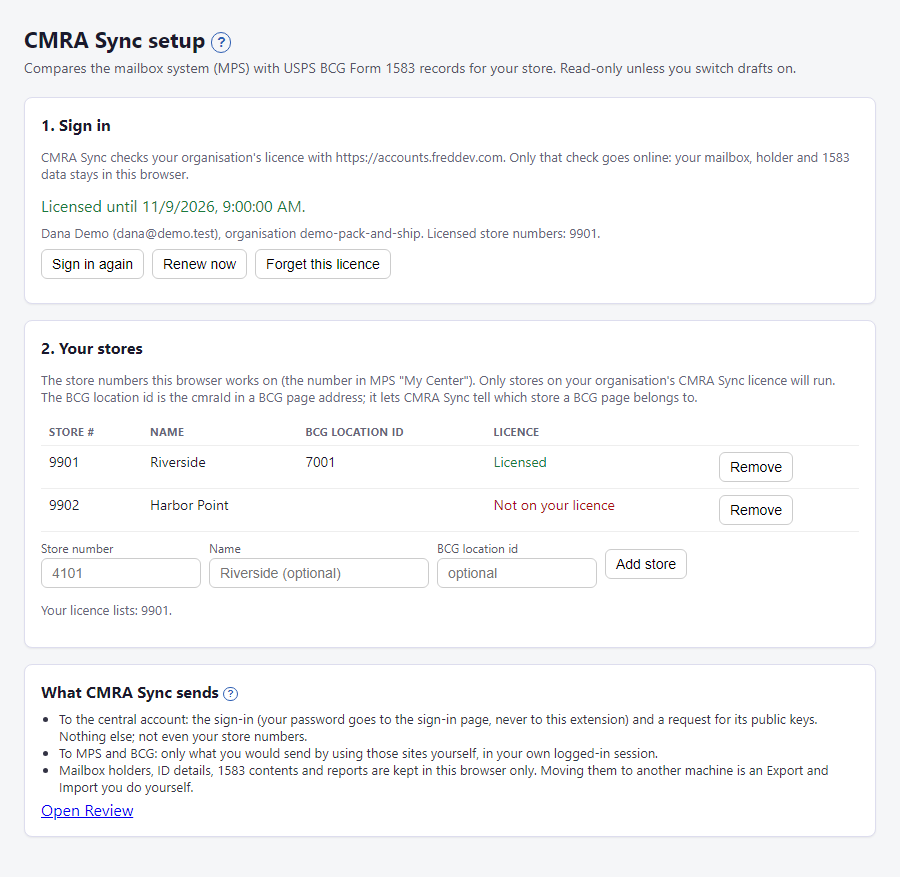
What CMRA Sync sends
A short summary of what goes online, with a link to Open Review. The full story is in What CMRA Sync never sends.
How long a licence lasts
| When | What happens |
|---|---|
| Day 0 | You sign in. The licence is good for 7 days. |
| Every day or so | CMRA Sync renews it quietly, if your FSC sign-in is still active in this browser. |
| After 3 days without a renewal | A warning shows: sign in again. |
| After 7 days | Grace begins. It keeps working for 7 more days. |
| After 14 days | It stops. Click Sign in again. |
When a licence is not valid, nothing new can be read or compared. What you saved can still be viewed and exported. Nothing is ever deleted.
On the MPS and BCG pages
| Where | What | Notes |
|---|---|---|
| Both panels | ✕ closes the panel to a small tab. | A run keeps going. |
| Both panels | The top line says Licensed. or why not. | |
| BCG panel | Store list | One of the stores you set up. With one store it is picked for you. |
Not available yet
There is an experimental switch for Create New 1583 Drafts. It is not in the version you installed, because the feature is waiting on a compliance review.