Appearance
Troubleshooting
Find your problem in the headings below. Your saved data is never deleted by any of these problems.
It says my store is not licensed
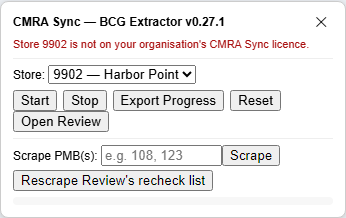
Why: CMRA Sync only runs for a store that is on your organisation's licence. The message is Store 9902 is not on your organisation's CMRA Sync licence., with your own store number.
Try this:
- Open the setup page. Under 1. Sign in, read Licensed store numbers. Is your store in the list?
- If it is not, click Sign in again. The list updates when you sign in.
- Check that you typed the store number the way MPS shows it.
- If it is still missing, your organisation's licence does not cover that store yet. Ask the owner who looks after your FSC account, or contact us.
Still stuck? What you already saved can still be viewed and exported, and nothing is lost.
It says to sign in
Why: The message is Sign in to CMRA Sync (extension icon, then Sign in) to use it. You are not signed in, or you used Forget this licence.
Try this: 1. Click the CMRA Sync icon in the toolbar. 2. Click Sign in and sign in with your FSC account.
It says my store is not set up
Why: The message is Store 9901 is not set up. Open CMRA Sync setup and add it. or No store is set. The store was never added, or it was removed.
Try this: Open the setup page and add the store under 2. Your stores. See Set up your store and sign in.
The licence warning, or "keeps working until"
Why: A licence lasts 7 days. CMRA Sync renews it by itself while you are signed in to your FSC account in this browser. If that fails, you see one of these:
- The licence has not been renewed for a few days. Sign in again to refresh it. The warning starts on day 3.
- The licence could not be renewed; CMRA Sync keeps working for a few more days. Sign in again. This is the grace period. It lasts 7 more days, and everything still works.
- The licence could not be renewed for over 14 days. It has stopped.
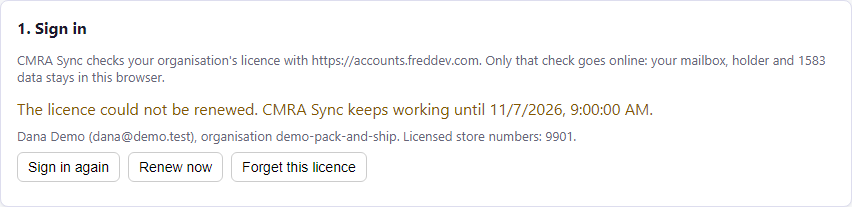
Try this:
- Open the setup page and click Sign in again.
- Look for Licensed until and a new date.
If it keeps failing, the setup page shows Last renewal problem with a reason. Check your internet connection. If the reason does not help, contact us with it.
Still stuck? The timings are in Settings.
It says my computer's clock is behind
Why: The date or time on this computer is earlier than CMRA Sync last saw. It stops the licence in that case.
Try this: 1. Set the date and time right (Windows: right-click the clock). 2. Click Sign in again on the setup page.
The panel is missing, or it cannot read my store
Why: CMRA Sync only draws its panel on certain pages.
- MPS: on the MPS site, after you have signed in. It is not drawn on the sign-in page. It reads your store from My Center in the page header, so a center has to be picked.
- BCG: on pages of the BCG CMRA service (the address starts with
https://cmra-ext.usps.com/cmra-external-webapp/). It is not on the main BCG home page.
Try this:
- Check you are signed in, and on the right site.
- For MPS, pick your center. The header must say My Center and a number.
- For BCG, go to Mailing Services, then Commercial Mail Receiving Agency, then Go to Service, then 1583, then Agent Location List.
- Look at the bottom right for a small MPS Extractor ▲ or BCG Extractor ▲ tab. Click it to open the panel.
- Reload the page.
If the log says found 0 roster rows, the list has not finished loading. Wait for it, then click Start again.
If the panel says (choose a store) or (no stores set up), pick a store from the list, or add one on the setup page.
Still stuck? MPS and BCG change their pages from time to time, and CMRA Sync may need an update. Contact us and tell us the address of the page.
There is nothing to compare
Why: Review needs both sides for the same store. You may see:
- No BCG extract saved for store #9901 yet — run the BCG Extractor there first.
- No MPS extract saved for store #9901 yet — run the MPS Extractor there first.
- No reports found, or Select a report above, or use "Compute diff" below to create one. Nothing has been compared yet.
Try this:
- Run the missing side. See Run a comparison.
- Make sure you picked the same store in the BCG panel as the one MPS uses.
- Open Review and click Compute Diff.
A run that you stopped is not saved to Review until it finishes. Click Start again to finish it.
Some boxes are marked as failed
Why: The bar says MPS extraction FAILED for ... box(es). CMRA Sync could not read those boxes reliably, so it records them as failed rather than empty. Otherwise every BCG form on them would look wrong.
Try this: Type those box numbers in Scrape box(es) in the MPS panel and click Scrape.
I see two CMRA Sync panels
Why: Two copies of the extension are installed.
Try this: On the extensions page, remove one. Export its store data first if it has data you need. See Install the extension.
I got a new computer, and my reports are gone
Why: Saved data lives only on the computer where you ran the comparison.
Try this: If the old computer still works, follow Move to another computer. Otherwise, run the comparison again.