Appearance
Request time off
Ask for days or hours off, like a vacation or a doctor visit. Anyone on the schedule can do this. A manager decides.
Steps
- Open Schedule, then Time Off. On a phone, tap ☰, then Time Off.
- For whole days, leave All day ticked. Pick the Start date and End date. For part of one day, untick it. Then pick the Date, Start time and End time.
- Fill in Total paid hours. For whole days, type the hours you would normally work, like 8 or 7.25. You can leave it blank. For part of a day, we work it out for you.
- Pick the Type, like PTO or Sick. Your store may have others. Untick Paid if the time off is unpaid.
- Under Shift Handover Notes, write anything the team needs to cover for you, like "I promised a customer their proof today." Keep it to work. Do not write personal or medical details.
- Tick I confirm this note contains no personal or medical information. The Submit request button stays pale until you do.
- Click Submit request.
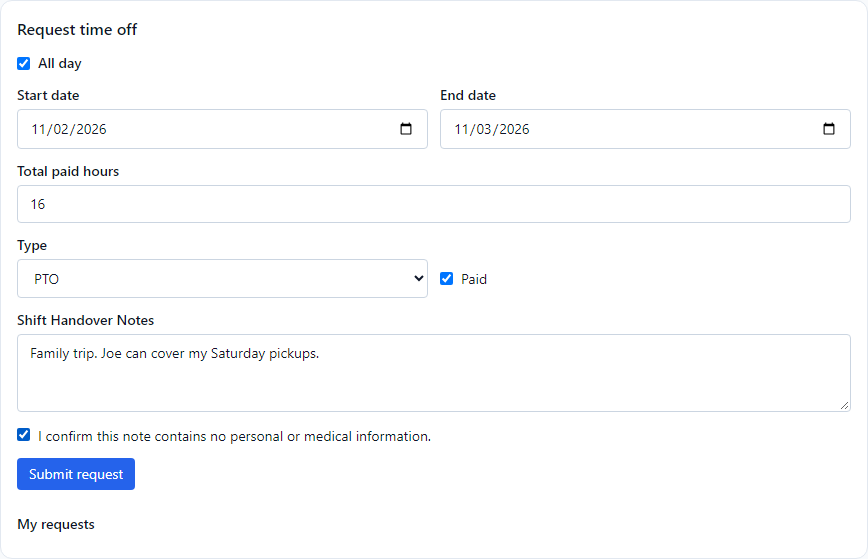
Your request appears under My requests with a yellow pending label.
What you may see while you fill it in
- A red box says "Time off can't be requested on" some days. Your manager has marked those days as closed to time off, such as a holiday weekend. Pick other dates, or ask your manager. The button stays off until you do.
- A yellow box says the maximum number of time-off requests has been reached. Enough people are already off those days. You can still send the request, but it may not be approved.
What happens next
Your managers get a message. When one decides, you get a notification: Time off approved or Time off denied. The label on the request turns green (approved) or red (denied).
On the schedule, time off that is waiting shows as a striped yellow box and approved time off as a striped pink one. Your next five requests also show on Home under My time off.
You cannot change or cancel a request yourself. If your plans change, ask a manager. They can edit or delete it.
If something looks wrong
- The Submit request button will not turn on. Tick the confirmation box under the note, and check that the dates are not blocked.
- The request is still pending. Ask your manager.
- You were denied. Talk to your manager. They can tell you why and what else works.
- You need time off for a day you are already scheduled. Send the request anyway, and talk to your manager. They decide who covers your shift.