Appearance
Stores and verification
Add the stores your business runs, ask us to check them, and close one when you stop running it. Only owners can do this.
A store here is a location of your business. The other FSC tools use this list.
Steps
- Open
accounts.freddev.com/storesin your browser. - Sign in with your email and password, then your two-step code. See Sign in.
- If you belong to more than one business, pick the right one.
The Stores page opens. It shows your stores, one per line, with the store number, name, state and time zone.
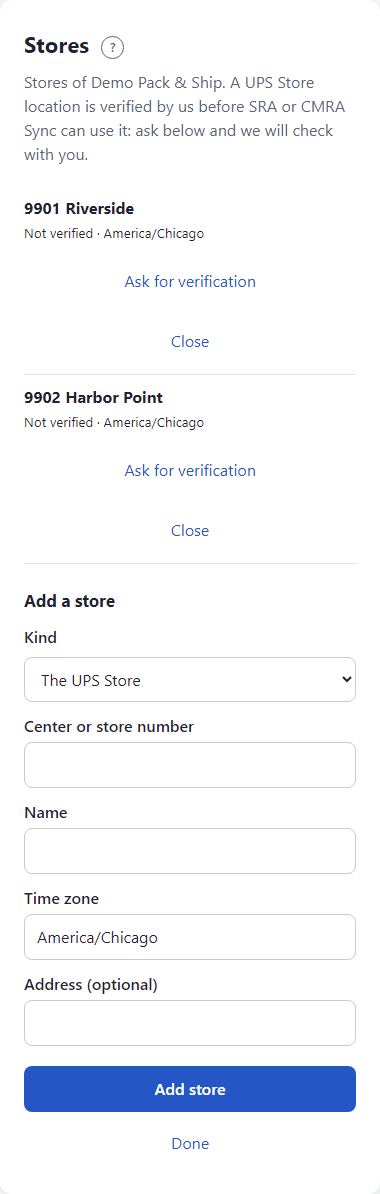
The page closes after 30 minutes. Click Done when you finish.
Add a store
- Under Add a store, pick the Kind: The UPS Store, or Independent for any other store.
- Type the Center or store number. Use 1 to 16 letters, digits or dashes.
- Type the Name, up to 80 characters.
- Check the Time zone. It starts as your business's time zone, such as
America/Chicago. - Add the Address if you like.
- Click Add store.
The store shows in the list.
Verification
A UPS Store location must be verified by us before Store Reports or CMRA Sync can use it. This protects you: nobody else can claim your store number.
- Find the store in the list. It says Not verified.
- Click Ask for verification. The line changes to Waiting for verification.
- We contact you to check that you run that store. We do this by talking to you; there is no link to click and no form to fill in.
- When we have checked, the line says Verified.
If we cannot verify it, the line says Not verified (rejected). You can click Ask for verification again once things are sorted out.
Stores of the kind Independent show Independent and need no verification.
If another business has already had that store number verified, we do not verify it for you, and we will talk to you about it.
Close a store
Click Close next to a store you no longer run. The line says Closed and its licences are updated. Closing cannot be undone from this page; contact us if you closed one by mistake.
What happens next
Your stores show up in the other tools. In the Scheduler, an owner's setup pulls the store list from here.
If something looks wrong
- Only an owner of the business can manage its stores. You are not an owner of the business you picked. Ask an owner.
- This business already has that store. The number is in your list. Check closed stores too.
- The center number is 1 to 16 letters, digits or dashes. Remove spaces and other marks.
- Choose a time zone. Type it the way the example shows, such as
America/Chicago. - This page has expired. Start again. Open the address again and sign in.
- More: Troubleshooting.